


SmartTag – AirTag Detector
0.00.00 Reviews
App Specs
- Version
- 6.0
- Updated On
- License
- Free
- Downloads
- 10,000+
- Developer
- Fa9ssa
- Categories
- Libraries & Demo
- Platform
- Android
Screenshots
 Analysis by AppCompare
Ever found yourself in a situation where you feel like someone might be tracking your every move? With the rise of smart tracking devices, this concern is more real than ever. Enter SmartTag – AirTag Detector, an app designed to give you peace of mind. If you’re curious about how it works and whether it’s worth downloading, you’re in the right place.
A household scenario where a scan can help
I can see this kind of Bluetooth detector being useful in a shared household, not because everyone needs to be suspicious of one another, but because belongings regularly move between people. A bag borrowed for a weekend, a set of keys passed between adults, or a suitcase returned from a trip can make it hard to remember what is attached to what. A deliberate scan gives someone a practical way to check their surroundings when they have a reason to do so.
Picture arriving home after a busy day and realizing that a bag you borrowed has spent the afternoon in several places. If you feel uneasy, you can use a Bluetooth-scanning app as one step in working out what is nearby. I would treat a detection as a prompt to look carefully, not as proof that a person is following you. A device may belong to someone nearby, and a scan alone does not explain who owns it or why it is present.
That distinction matters in a home with shared belongings. Before treating an alert as a personal threat, I would check whether a household member has attached a tag to an item, or whether a visitor’s belongings are close by. The most useful outcome may simply be identifying a familiar device and clearing up confusion. Used calmly, the app can support a sensible check without turning ordinary shared use into an accusation.
What is SmartTag – AirTag Detector?
The SmartTag – AirTag Detector is a nifty little tool for both Android and iOS users. It helps you detect unwanted AirTags or other Bluetooth tracking devices that might be following you around. In a world where privacy is paramount, having an app like this can be a game-changer.
What to expect from a Bluetooth check
Using the app is pretty straightforward. Once installed, it scans your surroundings for any unauthorized trackers. It’s like having your personal security guard on your phone. The app identifies these devices by detecting Bluetooth signals and notifies you if something suspicious pops up.
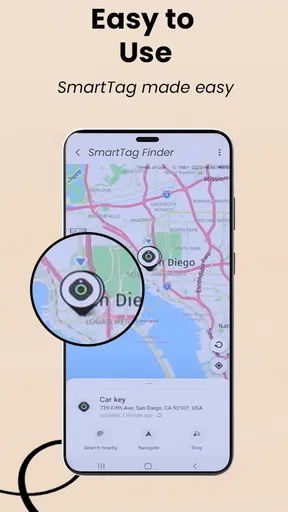
Once a device is detected, you can use the app to locate the tracker. It’s almost like a game of hide and seek, but with higher stakes. The app provides a proximity meter, which helps you find out if the tracker is getting closer or farther away.
Worth Reading Before You Choose

EA SPORTS FC Mobile 26 Is a Bigger Football Game, but It Takes Time

Flipboard Shows What News Apps Must Do Beyond the Feed

Switching to Android Auto Means Rethinking Your Driving Routine

Google Calendar Makes a Crowded Week Easier to Manage

Ludo King Makes the Most of the Minutes Between Plans

Baby Panda World Brings Quick Play to Modern Phones, but Its Game Library Feels Busy
In practice, I would approach a scan as a focused check rather than something to leave running in the background all day. Bluetooth signals can be affected by distance, walls, movement, and nearby devices, so results are best treated as clues to investigate. If the signal appears and disappears while you move, try scanning again from a different spot and give yourself time to see whether the reading changes consistently. This makes the search less like chasing a single fleeting alert and more like checking a lead methodically.
A useful habit is to scan in the places where the concern actually arose: near a bag, coat, vehicle, or room, rather than sweeping every room at random. If the app indicates a nearby device, move slowly and compare the signal as you change position. Avoid drawing conclusions from one momentary reading. The point of a proximity indication is to help narrow a search, not to provide the certainty of a physical inspection or explain the device’s owner.
Simple tools, with a few practical limits
What sets this app apart is its simplicity and effectiveness. The user interface is clean and intuitive, making it easy for anyone to use. You don’t need to be a tech whiz to figure it out. Just launch the app, and it does the heavy lifting for you.
- Real-time Scanning: The app constantly scans your environment for any unwanted devices.
- Proximity Meter: Helps you pinpoint the location of the tracker with ease.
- Device Identification: It doesn’t just detect; it identifies the type of device as well.
The simplicity is appealing when you want a quick check, but it also sets a boundary on what I would expect. Bluetooth detection can help draw attention to a signal; it cannot by itself establish whether a tracker is unwanted, identify the person who placed it, or settle a safety concern. A device might be nearby for an innocent reason, and a weak or changing signal may make it difficult to narrow down its exact position. I would use the app to guide a careful search, not as a substitute for judgment.
There is also a difference between finding a signal and resolving the situation. If you locate an unfamiliar tag, take a moment to consider whether it could be attached to a borrowed item or belong to someone close by. If you do not recognize it and remain worried, preserve your own safety and seek help from someone you trust or an appropriate local service. The app’s role is to help you check for a possible device; it should not be treated as a complete response plan.
Setting expectations before installing
This is a free app in the Libraries & Demo category, made by Fa9ssa. It has an Everyone age rating, and its current version is 6.0. It was released on October 13, 2025, and is listed for Android 7.0 or later. The store shows 10K+ installs and an average rating of 0.0, so I would not treat the rating figure as a meaningful body of user feedback. That makes a cautious, hands-on first check more useful than assuming the app has been widely validated.
One reasonable question is whether a scan can be trusted to find every tracker. I would not rely on any single Bluetooth scan as a guarantee. A detector can only help with devices whose signals it can pick up under the conditions around you. Keep your phone’s Bluetooth available while you check, stay near the belongings you are investigating, and repeat a scan if the first result seems unclear. If you have an immediate safety concern, do not let an app result delay seeking practical help.
Another question is whether the app can tell you who owns a detected device. A Bluetooth signal or device label is not the same thing as knowing the owner’s identity or intent. If you share a home, car, or bag with other people, ask about their trackers before assuming the device is hostile. This is a small but important step: it prevents a household misunderstanding from becoming an unnecessary confrontation, while still letting you take an unfamiliar finding seriously.
Using it around shared devices and belongings
For coordination, I would keep the process simple. If one adult checks a shared car or family bag, they can tell the others what they found and ask whether anyone recognizes the device. That conversation is often more useful than asking several people to scan at once and compare unexplained alerts. The app is a detector, not a household-management system, so any agreement about who checks which belongings has to come from the people sharing them.
This is especially relevant when people use the same phone at different times or share a device with a child. A scan could reveal a nearby Bluetooth signal, but it does not make a shared account or phone a private space. I would avoid using someone else’s phone to investigate them secretly, and I would explain a scan to an older child in plain language: it is a way to check for unfamiliar devices, not a way to monitor the child’s movements. For younger children, an adult should handle the check and any follow-up in an age-appropriate way.
For everyday use, the clearest workflow is to decide why you are scanning, check the relevant belongings, and note whether the result changes as you move. If the device seems familiar, confirm with the person who owns the item before taking further steps. If it does not, keep the search calm and focused. This avoids two common mistakes: treating every signal as evidence of wrongdoing, and dismissing a persistent concern because one quick scan showed nothing.
When another option may suit you better
Compared with the usual alternatives in this area, a Bluetooth detector is most useful when you want a direct, on-the-spot check from your phone. A tracker maker’s own tools may be more appropriate for managing a tag that you own, while built-in phone safety features can complement a separate scan. Those approaches serve different purposes: checking for a possible nearby signal is not the same as managing your own tracking device, and neither should be confused with a broader personal-safety plan.
I would choose this app if I wanted a straightforward way to look for nearby Bluetooth trackers and then investigate a signal in person. I would skip it if I expected a complete anti-stalking service, a guaranteed inventory of every device around me, or a way to identify and confront a tracker’s owner. Someone who needs a more comprehensive response should combine careful checking with trusted people and appropriate local support, rather than expecting a single app to settle the issue.
It is also worth thinking about the setting. In a crowded station, café, or apartment building, other people’s Bluetooth devices may be close enough to complicate interpretation. At home, where you can move around a particular bag or coat without rushing, a scan may be easier to follow up. If you are traveling, checking your luggage after arrival may feel more manageable than repeatedly scanning every public place you pass through. These are practical trade-offs, not a promise that one location guarantees a better result.
Who will get the most from it
In today’s digital age, privacy is a luxury. With tracking devices becoming increasingly accessible, knowing who might have an eye on you is crucial. Whether you’re a frequent traveler, a parent wanting to ensure your child’s safety, or just someone who values privacy, this app can be a valuable addition to your toolkit.
Imagine you’re walking through a crowded airport or enjoying a coffee at your favorite cafe. The last thing you want is to unknowingly carry an unwanted tracker. This app gives you the ability to take control of your personal space.
I think it fits best for someone who understands that a detector offers one useful check, not certainty. A traveler who has a specific reason to inspect a bag, or a person who has found an unfamiliar tag and wants to investigate it, may appreciate a direct Bluetooth scan. Someone who wants to manage a tag they own, keep tabs on a family member, or continuously monitor a location should look for a purpose-built option instead. Those are different needs, and a detector should not be stretched into a tracking or family-coordination tool.
For parents, the age rating of Everyone means the app is presented as suitable for a general audience, but I would still make the purpose of using it clear. A child’s safety conversation should focus on what to do if they find an unfamiliar device and which trusted adult to tell, rather than suggesting that the app can guarantee protection. In a household, trust and open communication matter just as much as the scan itself. The app can help start a practical conversation; it cannot replace one.
My Personal Take
Having tried the app myself, I can say it’s a reassuring tool. I felt a lot safer knowing I had a way to detect any sneaky trackers. The app worked seamlessly, and the alerts were prompt. I especially loved the proximity feature; it felt like having a mini radar in my pocket!
One thing to note, though, is that it’s more of a preventative measure. It won’t remove the trackers for you, but it will arm you with the knowledge you need to take the next steps.
In conclusion, if you’re concerned about your privacy and want a reliable way to detect unwanted tracking devices, the SmartTag – AirTag Detector is worth checking out. It’s simple to use, effective, and could be just what you need to keep your personal space secure.
A measured household verdict
My recommendation is a measured one. This app may be useful as a simple first check when you are concerned about a possible Bluetooth tracker, especially if you can investigate a particular item in a calm setting. Its appeal is that it brings scanning and a proximity-based search into a phone app rather than asking you to begin with a complicated process. The main trade-off is that a signal is only a clue: you still need to interpret it, check the item, and decide what to do.
For a shared household, I would use it as a tool for transparent checks rather than quiet surveillance. Talk with the people who share bags, vehicles, or devices; agree on who is checking what; and do not mistake a nearby signal for evidence about someone’s intentions. If you want an uncomplicated detector and are comfortable following up on its findings yourself, it is worth considering. If you need certainty, device ownership details, or a complete safety solution, this is not the right app to rely on alone.
Pros
- Accurately detects nearby AirTags.
- Simple and intuitive user interface.
- Low battery consumption.
- Works seamlessly in the background.
- Regular updates for improved accuracy.
Cons
- Limited functionality on older devices.
- Occasional false positives.
- Requires location services active.
- No offline mode available.
- Ads can be slightly intrusive.
FAQs for SmartTag – AirTag Detector
What is SmartTag – AirTag Detector used for?
SmartTag – AirTag Detector is designed to help users identify and locate Bluetooth tracking devices, such as AirTags, that might be nearby. This app is particularly useful for ensuring privacy and security by detecting hidden trackers that may be used without your consent.
How does SmartTag – AirTag Detector work?
The app scans for nearby Bluetooth signals and identifies trackers like AirTags. Once detected, it provides the user with information about the device, such as its unique identifier and proximity. This allows users to determine if an unwanted tracker is present and take appropriate action.
Is SmartTag – AirTag Detector compatible with both Android and iOS devices?
Yes, SmartTag – AirTag Detector is available for both Android and iOS platforms. The app is designed to work seamlessly across a variety of devices, ensuring that users can protect their privacy regardless of their phone's operating system.
Does SmartTag – AirTag Detector require an internet connection to function?
No, SmartTag – AirTag Detector does not require an internet connection to detect nearby Bluetooth devices. The app operates locally on your device, using your phone's Bluetooth capability to scan for and identify nearby trackers.
Are there any privacy concerns when using SmartTag – AirTag Detector?
SmartTag – AirTag Detector is designed with user privacy in mind. It does not collect or store personal data beyond what is necessary for its functionality. Users can rest assured that their data is not shared with third parties, ensuring peace of mind while using the app.


